Profile Settings
How to Update Your Profile Information on the Marketplace
Step 1: Log In
- Before you can update your profile information, make sure you are logged into the Silky Systems Marketplace.
Step 2: Access Profile Settings
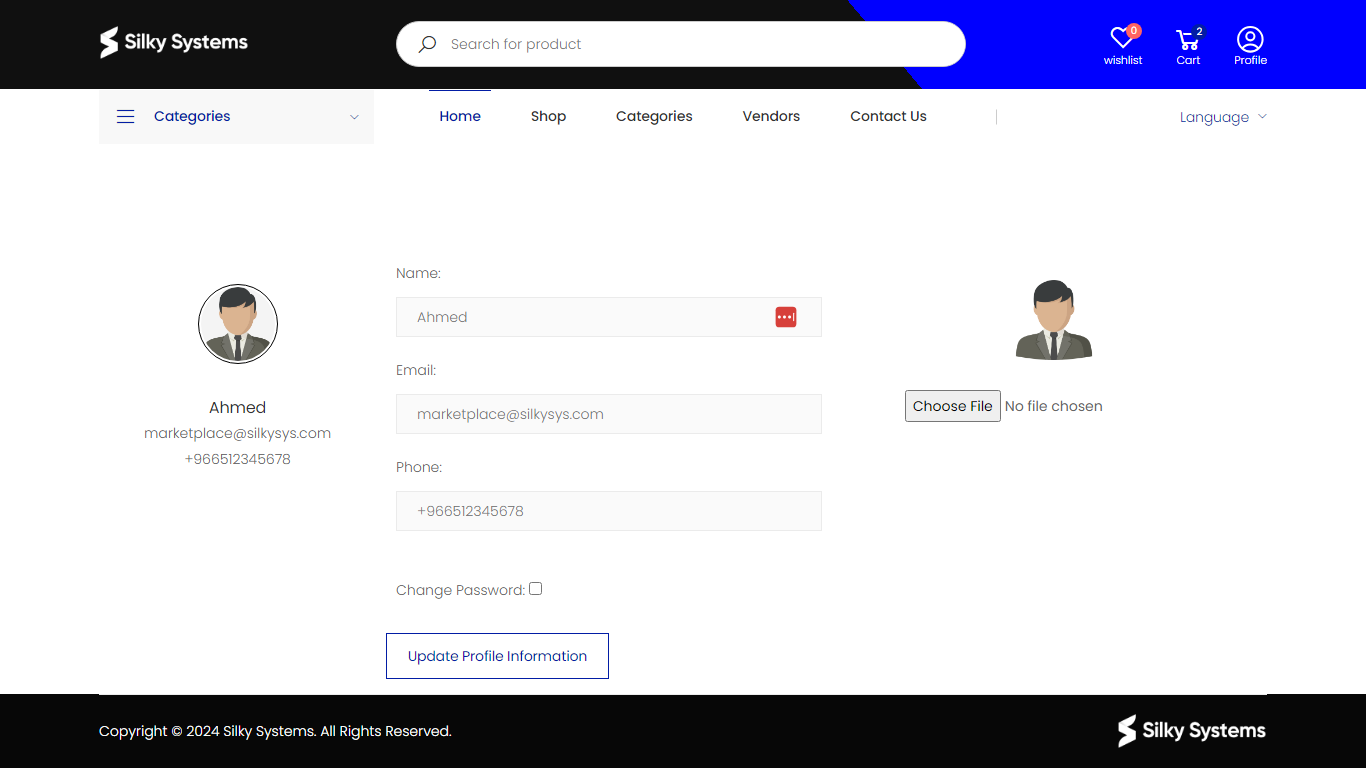
- Navigate to your profile by clicking on the 'Profile' link, usually located at the top right corner of the marketplace website.
Step 3: Edit Your Details
- Once you are on the profile page, you will see your current information displayed.
- To change any information, click on the text box next to the detail you wish to update.
Step 4: Change Your Profile Picture
- To update your profile picture, click on the current picture.
- Select 'Choose File' to upload a new photo from your computer. Remember, no file will be uploaded until you select one and confirm.
Step 5: Update Contact Information
- If you need to update your email or phone number, click the respective text box and edit the information.
- Ensure your email is correct as this is often used for communication and account recovery.
Step 6: Change Password (Optional)
- For security reasons, you might want to change your password periodically.
- Check the 'Change Password' box if you wish to set a new password, and you will be prompted to enter a new one.
Step 7: Save Changes
- After making your desired changes, click the 'Update Profile Information' button to save them.
- You should receive a confirmation message indicating that your profile has been updated successfully.
Step 8: Log Out (Recommended)
- Once you have updated your profile information, it is a good practice to log out and then log in again to ensure all changes have been applied correctly.
Remember to keep your profile information up to date for a smoother experience on the Silky Systems Marketplace.